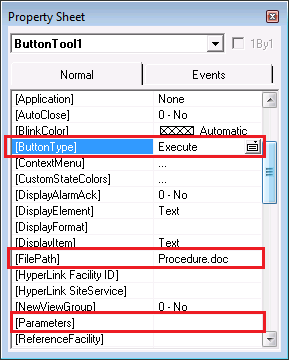
CygNet applications can be started from CygNet Studio through use of the CygNet Button Tool.
When the button object’s [ButtonType] property is set to Launch, the name of the application specified by the [Application] property will be started when a user clicks the button. Non-CygNet applications can also be started from CygNet Studio through use of the Button Tool.
By setting the button object’s [ButtonType] property to Execute, the name of the application specified by the [FilePath] property will be started when a user clicks the button. For both CygNet and Non-CygNet Applications, if the [FilePath] property specifies the name of a file, that file will open when a user clicks the button. The user’s computer must have a file type association or an error will occur.
Note: If User Account Control (UAC) is enabled, launching a version-managed CygNet application will require administrator-level permission. See CygNet and User Account Control for more information.
|
|
|

